From the Scrivener File menu, choose "Compile".
Put checkmarks next to what you want to send. I send chapters, not character notes etc.
Select "Compile for ePub."
Click on "Compile"
In the Export screen that pops-up, make sure the Folder is set to the Dropbox folder that your phone is linked to.
Click on Export.
On your phone, open your Dropbox app.
Click on the file in the dropbox.
When you get the "Couldn't Load File" message, click on the "Send to" icon in the lower left corner.
In the pop-up, choose "Open In . . ."
In the next screen, choose "Open in iBooks"
Showing posts with label Scriviner. Show all posts
Showing posts with label Scriviner. Show all posts


5.29.2014
Writing Toys and Tools for the iOS environment
When I can't get my story to move forward (usually because I am writing a chapter from the wrong POV -- point of view -- and I haven't yet noticed that or because there are other people in the house making noise), I work on setting up my technology for the most efficient use of the wee writing windows I do have.
I do all the actual writing in Scrivener on my big home computer. My arthritic fingers insist on its ergonomically correct keyboard and there is no way around this. But I can't and really don't want to run to my desk whenever I get a thought.
No problem!
I just use the voice memo function on my phone to capture stray brilliant inspirations (rare) and/or crippling plot errors I just now realized (more common than I wish). Then when I do get to the computer I listen to the memos and add to my running Manuscript ToDo list.
Another big happy discovery was Scriviner's ability to publish to iBooks. I really dislike printing to paper as it is wasteful and cumbersome, but there are times that I really just want to read the story, or just that delicious chapter that fell from my fingertips last night, and I want to read somewhere other than my desk.
No problem!
I figured out how to send my work-in-progress to iBooks which lets it look just like a real book that I can read on my phone or my iPad. As I read, if I find places to edit, I can make a note right in the book and then at the end of my session, I can email my notes, sorted in order of chapter, back to myself. This gives me an ordered list of edits to make when I am next at my big computer.
Happy happy.
5.25.2014
Mac Apps for Writers

Or check it out on the iTunes store: Scrivener. Or just take my word for it. Scrivener is the bomb.

 The last on my hit parade tonight (because I really should be writing: 700 words to go) is Snowflake Pro and if you leave a comment, I'll tell you how to get it for half-off.
It's a complete plot and plan application and I really should have started with this one 15 years ago when I started my story. I'll be using it tonight to try to crumple up some of my flatter characters.
3.26.2013
Software for Writers: Scrivener, How I Love Thee.
I have found the Best. Thing. Ever. Scrivener, by Literature and Latte is a writer's best friend. I am using it for fiction, but had I known about it, I would certainly have used it for all those long grad school papers. It organizes drafts, comments, and notes, and I can even stash reader's comments in it.
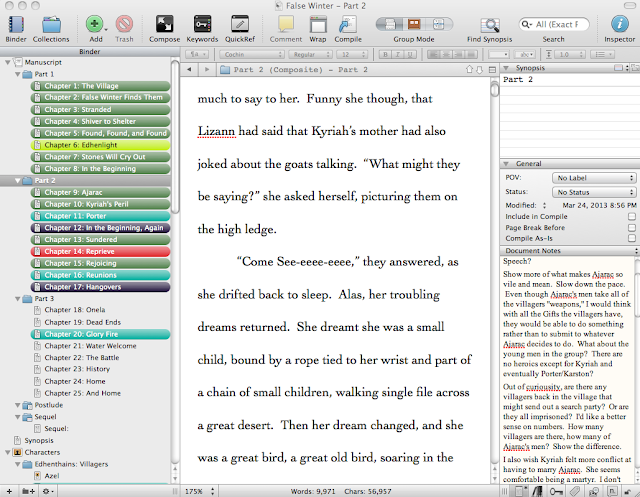
The compiler. In my old word-processor, the whole novel was in one document. A change that required backward revision required a lot of scrolling. Yuck. In Scrivener, I can divide the novel into parts, chapters, sections, etc. and view each discrete chunk, or the whole thing. You can see in the above screenshot the outline on the left. A click on any heading shows all the content below it.
The character list. Also in the left sidebar is a list of characters. As they reveal their personalities and characteristics to me, I can record these details in their character entry.
The comments. Just like in other word-processors, I can insert comments. This is really useful when I am writing new material and realize that something I am writing now necessitates a small revision in a previous portion. Rather than stop and go tend to it, I can just toss in a comment to remind me to take care of it later. When I sit down to write, I can click on the whole manuscript and all the comments appear. I can pick through them and decide what I want to work on next. A click on the comment takes me to that section.
And since I am writing and home-school (aka frequently interrupted) I can use the commenting feature to dash off a quick note of what I was going to do prior to being pulled away.
The notes. I can toggle that right sidebar to show either my own comments or the notes from other readers which I have cut-and-pasted in. Sometimes reader's comments come in and I am not in the mood to deal with that section yet. No problem! I just paste the comments into the Notes for that portion and they are there waiting for me when I am ready.
The back-ups. It saves automatically all the time. I can also take snapshots of it before I venture off in an experimental direction. If I dislike my experiment I can revert to the snapshot. Also, when I shut it down, it backs up everything.
The customer support. I had one small not-my-fault technical glitch and the customer support was prompt and personable and reassuring.

I easily uploaded my working draft into it from MS Office and I can export my draft into pdf, kindle versions, etc. without any fuss at all. Some of my favorite features are listed below.
The corkboard. I make for each chapter a little synopsis and then they
show up on the corkboard. This is really helpful for looking at the big
picture.
 |
| This screenshot is not of my story, but is one provided by the makers. |
The compiler. In my old word-processor, the whole novel was in one document. A change that required backward revision required a lot of scrolling. Yuck. In Scrivener, I can divide the novel into parts, chapters, sections, etc. and view each discrete chunk, or the whole thing. You can see in the above screenshot the outline on the left. A click on any heading shows all the content below it.
The character list. Also in the left sidebar is a list of characters. As they reveal their personalities and characteristics to me, I can record these details in their character entry.
The comments. Just like in other word-processors, I can insert comments. This is really useful when I am writing new material and realize that something I am writing now necessitates a small revision in a previous portion. Rather than stop and go tend to it, I can just toss in a comment to remind me to take care of it later. When I sit down to write, I can click on the whole manuscript and all the comments appear. I can pick through them and decide what I want to work on next. A click on the comment takes me to that section.
And since I am writing and home-school (aka frequently interrupted) I can use the commenting feature to dash off a quick note of what I was going to do prior to being pulled away.
 |
The notes. I can toggle that right sidebar to show either my own comments or the notes from other readers which I have cut-and-pasted in. Sometimes reader's comments come in and I am not in the mood to deal with that section yet. No problem! I just paste the comments into the Notes for that portion and they are there waiting for me when I am ready.
 |
The customer support. I had one small not-my-fault technical glitch and the customer support was prompt and personable and reassuring.
Scrivener runs on Mac or Windows and costs between $35 and $45 depending on platform and whether or not you qualify for the Educator's discount. This is not a sponsored post, but if you do click on the links here and purchase, I get a small commission. I'd be talking it up even without the commission though.

Subscribe to:
Posts (Atom)