I have found the Best. Thing. Ever. Scrivener, by Literature and Latte is a writer's best friend. I am using it for fiction, but had I known about it, I would certainly have used it for all those long grad school papers. It organizes drafts, comments, and notes, and I can even stash reader's comments in it.
I easily uploaded my working draft into it from MS Office and I can export my draft into pdf, kindle versions, etc. without any fuss at all. Some of my favorite features are listed below.
The corkboard. I make for each chapter a little synopsis and then they
show up on the corkboard. This is really helpful for looking at the big
picture.
 |
| This screenshot is not of my story, but is one provided by the makers. |
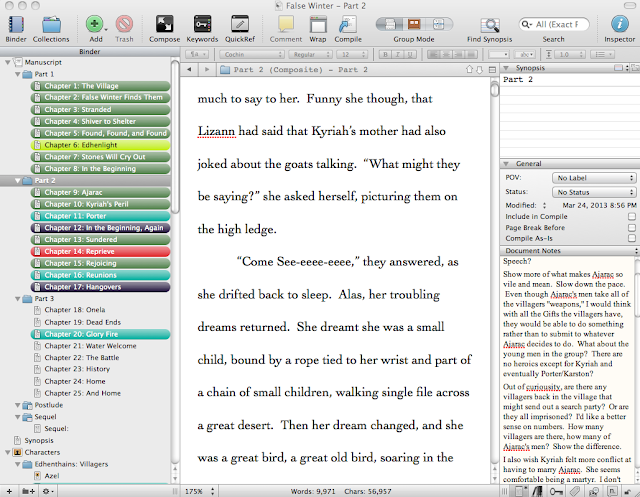
The compiler. In my old word-processor, the whole novel was in one document. A change that required backward revision required a lot of scrolling. Yuck. In Scrivener, I can divide the novel into parts, chapters, sections, etc. and view each discrete chunk, or the whole thing. You can see in the above screenshot the outline on the left. A click on any heading shows all the content below it.
The character list. Also in the left sidebar is a list of characters. As they reveal their personalities and characteristics to me, I can record these details in their character entry.
The comments. Just like in other word-processors, I can insert comments. This is really useful when I am writing new material and realize that something I am writing now necessitates a small revision in a previous portion. Rather than stop and go tend to it, I can just toss in a comment to remind me to take care of it later. When I sit down to write, I can click on the whole manuscript and all the comments appear. I can pick through them and decide what I want to work on next. A click on the comment takes me to that section.
And since I am writing and home-school (aka frequently interrupted) I can use the commenting feature to dash off a quick note of what I was going to do prior to being pulled away.
The notes. I can toggle that right sidebar to show either my own comments or the notes from other readers which I have cut-and-pasted in. Sometimes reader's comments come in and I am not in the mood to deal with that section yet. No problem! I just paste the comments into the Notes for that portion and they are there waiting for me when I am ready.
The back-ups. It saves automatically all the time. I can also take snapshots of it before I venture off in an experimental direction. If I dislike my experiment I can revert to the snapshot. Also, when I shut it down, it backs up everything.
The customer support. I had one small not-my-fault technical glitch and the customer support was prompt and personable and reassuring.
Scrivener runs on Mac or Windows and costs between $35 and $45 depending on platform and whether or not you qualify for the Educator's discount. This is not a sponsored post, but if you do click on the links here and purchase, I get a small commission. I'd be talking it up even without the commission though.